I’ve restored a few posts in the last few months that were lost. I didn’t restore any of the comments. Honestly, I should have but I didn’t even think about it. But when I went to restore the In Cell Charting post, I noticed there were 85 comments. That seemed worth my while.
First I set a reference to Microsoft XML, v6.0 and Microsoft HTML Object Library. Here’s the main procedure.
|
1 2 3 4 5 6 7 8 9 10 11 12 13 14 15 16 17 18 19 20 21 22 23 24 25 26 27 28 29 30 31 32 33 34 35 36 37 38 39 40 41 42 |
Public Sub CreateCommentSQL() Dim xHttp As MSXML2.XMLHTTP Dim hDoc As MSHTML.HTMLDocument Dim hOLComments As MSHTML.HTMLOListElement Dim hLIComments As MSHTML.IHTMLElementCollection Dim hLIComment As MSHTML.HTMLLIElement Dim clsComments As CComments Dim clsComment As CComment 'Go get the lost comments from the wayback machine Set xHttp = New MSXML2.XMLHTTP xHttp.Open "GET", "http://web.archive.org/web/20100418043617/http://www.dailydoseofexcel.com/archives/2006/02/05/in-cell-charting/" xHttp.send 'Wait until the page loads Do: DoEvents: Loop Until xHttp.readyState = 4 Set clsComments = New CComments 'Load the document Set hDoc = New MSHTML.HTMLDocument hDoc.body.innerHTML = xHttp.responseText 'The ordered list has an id of "comments" Set hOLComments = hDoc.getElementsByName("comments")(0) 'Get all the listindex elements Set hLIComments = hOLComments.getElementsByTagName("li") For Each hLIComment In hLIComments Set clsComment = New CComment With clsComment .AddNameFromCite hLIComment.getElementsByTagName("cite")(0) .AddDate hLIComment.getElementsByClassName("comment-meta commentmetadata")(0) .AddContent hLIComment.getElementsByTagName("p") End With clsComments.Add clsComment Next hLIComment clsComments.CreateSQLFile End Sub |
I looked at the source for the web page to figure out how it was laid out and how to get at the data I needed. The CComment and CComments classes store the data as I loop through the list index items in the comment list. The first CComment method is AddNameFromCite. I didn’t even know there was a Cite tag in HTML (but you could fill a warehouse with what I don’t know about HTML).
|
1 2 3 4 5 6 7 8 9 10 11 12 13 |
Public Sub AddNameFromCite(ByVal hCite As MSHTML.HTMLPhraseElement) Dim hAnchor As MSHTML.HTMLAnchorElement Me.Author = hCite.innerText Set hAnchor = hCite.getElementsByTagName("a")(0) If Not hAnchor Is Nothing Then Me.AuthorLink = Mid$(hAnchor.href, InStr(2, hAnchor.href, "http://"), Len(hAnchor.href)) End If End Sub |
I made this a method because I generally reserve properties to getting/setting values. If I change more than one property or do any extensive manipulation, I go with a method instead of a property. I’m not uber-consistent about it though. The comment author’s name is the innertext of the PhraseElement (that’s what a Cite is, at least according to the TypeName function). To get the AuthorLink, I need to find the anchor and get the href attribute. Because the wayback machine put its own URL in from of other URLs, I had to find the second instance of “http://” to get the real link. Next the AddDate method.
|
1 2 3 4 5 6 7 8 9 10 11 |
Public Sub AddDate(ByVal hDiv As MSHTML.HTMLDivElement) Dim sDate As String Dim vaDate As Variant sDate = hDiv.innerText vaDate = Split(sDate, " at ") Me.CommentDate = DateValue(vaDate(0)) + TimeValue(vaDate(1)) End Sub |
This really should have been a property instead of a method, but oh well. The innertext of the DivElement is something like “January 1, 2010 at 6:16 am”. I split that string on the “at” and used DateValue and TimeValue to build a date. Finally the content of the comment.
|
1 2 3 4 5 6 7 8 9 10 11 12 |
Public Sub AddContent(ByVal hParas As MSHTML.IHTMLElementCollection) Dim hPara As MSHTML.HTMLParaElement Dim sContent As String For Each hPara In hParas sContent = sContent & hPara.innerText Next hPara Me.Content = sContent End Sub |
I passed in a collection of elements that are ParaElements (tag=p=paragraph). Then I looped through them and concatenated a string for the content. By looping through just the p elements, I skip all the comment meta crap that is auto-generated by WordPress and just get to the text.
At this point I have 85 CComment objects and I’m ready to build the SQL string.
|
1 2 3 4 5 6 7 8 9 10 11 12 13 14 15 16 17 18 19 20 21 22 23 24 25 26 27 28 29 30 31 32 33 34 |
Public Sub CreateSQLFile() Dim sFile As String, lFile As Long Dim clsComment As CComment Dim sSql As String Dim aSql() As String Dim lCnt As Long ReDim aSql(1 To Me.Count) 'Build the first part of the sql string with the column names sSql = "INSERT INTO `wp_comments` (`comment_post_ID`, `comment_author`, `comment_author_email`, `comment_author_url`," sSql = sSql & Space(1) & "`comment_author_IP`, `comment_date`, `comment_date_gmt`, `comment_content`, `comment_karma`," sSql = sSql & Space(1) & "`comment_approved`, `comment_agent`, `comment_type`, `comment_parent`, `user_id`) VALUES" & vbNewLine 'Put all the comment values in an array For Each clsComment In Me lCnt = lCnt + 1 aSql(lCnt) = clsComment.SQLInsert Next clsComment 'put it all together sSql = sSql & Join(aSql, ", " & vbNewLine) & ";" 'write it to a sql file sFile = ThisWorkbook.Path & Application.PathSeparator & "wp_incellcomments.sql" lFile = FreeFile Open sFile For Output As lFile Print #lFile, sSql Close lFile End Sub |
Just a bunch string building and putting in a file that I can import into PHPMyAdmin. In the CComment class, the values are put together like this
|
1 2 3 4 5 6 7 8 9 10 11 12 13 14 15 16 17 18 19 20 21 22 23 24 25 26 27 28 |
Public Property Get SQLInsert() As String Dim sReturn As String Dim aReturn(1 To 14) As Variant Const sNOVALUE As String = "''" Const sSQ As String = "'" aReturn(1) = "7534" aReturn(2) = sSQ & EscSq(Me.Author) & sSQ aReturn(3) = sNOVALUE aReturn(4) = sSQ & EscSq(Me.AuthorLink) & sSQ aReturn(5) = sNOVALUE aReturn(6) = sSQ & Format(Me.CommentDate, "yyyy-mm-dd hh:mm:ss") & sSQ aReturn(7) = aReturn(6) aReturn(8) = sSQ & EscSq(Me.ContentScrubbed) & sSQ aReturn(9) = 0 aReturn(10) = sSQ & "1" & sSQ aReturn(11) = sNOVALUE aReturn(12) = sNOVALUE aReturn(13) = 0 aReturn(14) = 0 sReturn = "(" & Join(aReturn, ", ") & ")" SQLInsert = sReturn End Property |
I really like this method of building a string – putting it into an array and using Join – so I think I’ll start using it. The EscSq function turns any single quotes into two single quotes. The ContentScrubbed property converts any vbNewLines into \r\n. I exported some existing comments from MySQL to see how all this stuff went together. In the end, I ended up with a file that looks like this.
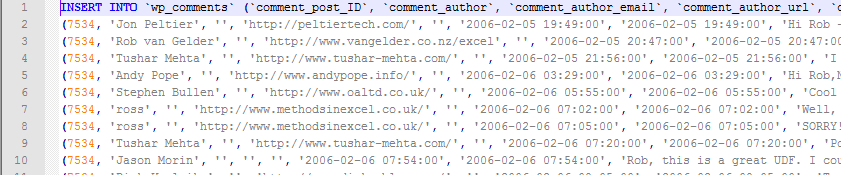
phpMyAdmin kept erroring out that the file was using too much memory. It’s 51kb, so I knew that wasn’t true. But the helpful people at HostGator imported it for me and set me up with console access so I can do it myself next time. I just need to learn the commandline stuff for importing.
I took a quick look through through the comments and they look alright. It’s hard to tell what I screwed up formatting-wise because some people use code tags and most don’t. But the info appears to be there and that’s the most important thing. I guess since I have this set up, I should go back and make sure any other lost posts get their comments too.
As always, if you see something that’s not right on the site, shoot me an email. I have a few hundred posts that still look like crap, but are readable and I’m fixing them as I see them.
Dick:
There are differences from your restored comments and what is on the attached link.
This comment is truncated and out of order to his first post.
nixnut says:
March 16, 2007 at 2:05 am
http://web.archive.org/web/20100418043617/http://www.dailydoseofexcel.com/archives/2006/02/05/in-cell-charting/
Sincerely,
Tom Webb
PS. I mistakenly posted this to the restored page.